AI Business Idea Hunter (Global)
Ready to use?
1. Overview
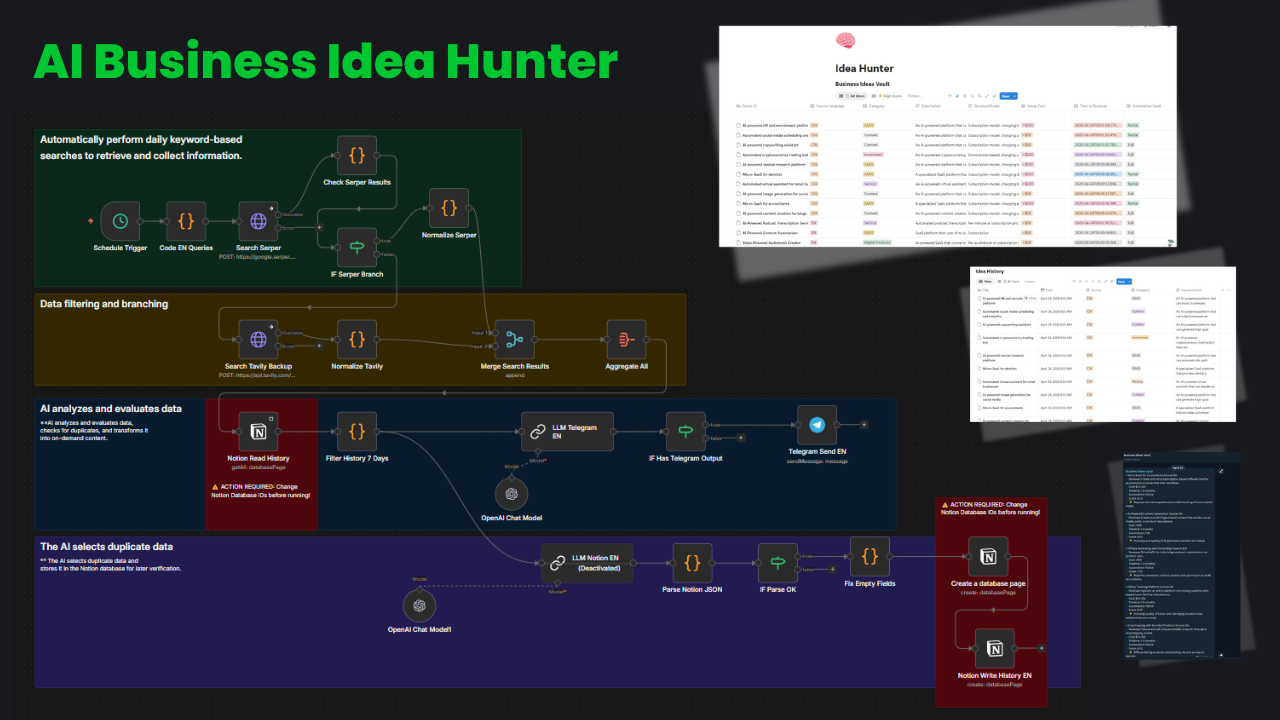
This is a complex automation workflow designed for market research. It acts as a “Virtual Assistant” hunting for business opportunities globally.
🚀 Key Highlight: This workflow not only collects news (scraping) but also translates (Chinese to English) and evaluates (reasoning) using AI. Only high-potential ideas are sent to you.
2. Key Features
A. A. Multi-language & Multi-source Collects data from the world’s largest markets:
- English Sources: Leading business news sites (US/Global).
- Chinese Sources: Auto-translates from Chinese to English.
B. AI Scoring System
- Uses LLM to analyze news potential on a scale of 10 based on feasibility and market trends.
🧠 Smart Filtering: Only sends alerts when the score is above 7/10. Low-score items are discarded automatically.
C. Notion Memory & Anti-Duplicate
- Uses Notion Database as “Long-term memory”.
- Check: Before processing, checks if the title exists in Notion.
- Prevent Duplicates: If exists -> Skip. If not -> Process and Save.
- This ensures you never receive duplicate notifications about an old idea.
3. Detailed Setup Guide
To run this workflow, prepare the following resources:
⚙️ Prerequisites
- OpenAI API Key: Used for translation and scoring features (Recommended model: anthropic/claude-3-haiku).
- Notion Integration Token: Required to connect and write data to the Database.
- Notion Database ID: The ID of the database storing the ideas.
- Telegram Bot Token & Chat ID: Used to receive notifications.
Steps:
- Import: Download the JSON file and import it into your n8n instance.
- Configure Credentials: Enter your OpenAI API Key, Notion Token, and Telegram Bot Token into the corresponding nodes.
Notion Setup:
- **Create a Notion Database with the following columns: Title, Score, Summary, Source URL.
- **Copy the Database ID into both the “Notion - Check Duplicate” and “Notion - Create Item” nodes.
- **Activate: Enable the workflow and configure the execution schedule (e.g., daily at 6:00 AM).
⚠️ Cost Warning: This workflow calls the OpenAI API for every processed article (Translation + Scoring). Be cautious when setting up continuous schedules to avoid unnecessary API charges. It is recommended to test with a limit of 5 articles first.