The on-prem AI trend 2026: Why regulated industries are leaving the cloud to run local LLMs

Author: Vinh Automation
Content type: Trend analysis
Audience: AI practitioners, technical staff in regulated industries, freelancers, tech enthusiasts
Reading time: 15 minutes
Last week, I was scrolling through X and Reddit and found at least four different threads all talking about the same thing: running LLMs (Large Language Models) on-premises for sensitive data.
Not product reviews. Not blog link shares.
Real people asking how to build, how to deploy, how much it costs. One thread by @regent0x_ compiled a build guide for a Strix Halo machine for a law firm. Nearly 2K likes. Someone else asked how to deploy RAG (Retrieval-Augmented Generation) on a mini PC so data never leaves the building. A third thread compared cloud costs versus on-prem for a small clinic.
I sat down and read them all. Then I read more. Then I realized these weren’t one-off posts anymore. They were a pattern.
Three years ago, these questions only appeared in niche forums. In 2026, they’re mainstream.
The thesis of this piece: Regulated industries handling sensitive data (legal, healthcare, finance) are leading a shift from cloud computing to hybrid and on-premises models for sensitive workloads. The reason isn’t just compliance. It’s that hardware is finally powerful enough, the open-source stack has matured, and there’s a non-negotiable need: data must stay where it belongs.
But to understand why this trend is exploding now, not two or three years ago, we need to look at four converging factors.
Part 1: Why now?
1.1 Privacy and compliance - the most obvious reason
HIPAA, GDPR, EU AI Act, attorney-client privilege.
These aren’t acronyms to tick off a checklist. In healthcare, a single leaked patient record can lead to fines in the tens of thousands of dollars. For lawyers, leaked privileged communication means losing their license.
I read a thread on r/LocalLLaMA about a clinic that tried using GPT for clinical note summarization. Data went through the API. IT caught it two weeks later. The project was killed immediately.
(No one wants to explain to the board of directors why patient data ended up on a server in an unknown location.)
What’s surprising is how often this story repeats. A new thread every week. And every time, it ends the same way: “We moved it local.”
Table 1: Compliance risk comparison across industries
| Industry | Key regulation | Risk of data leaving to cloud | Penalty (public info) |
|---|---|---|---|
| Healthcare | HIPAA (US) | Loss of insurance, per-record fines | $50,000+ per record |
| Legal | Attorney-client privilege | Loss of privilege protection | Priceless (lost case) |
| Finance | SOX, GDPR | Revenue-based fines | 4% of global revenue (GDPR) |
| Consulting | NDA, intellectual property | Loss of trust, lawsuits | Per contract |
(Sources: public information from HHS.gov, GDPR enforcement tracker, discussion threads on X and Reddit.)

Risk levels vary across industries when using cloud AI, with healthcare and legal facing the highest stakes
This is reason number one. It goes beyond technical considerations. It’s a trust signal.
So what about cost? This is where the story gets more interesting.
1.2 Cost - it’s not simple
Inference (the process of an AI model generating predictions) on the cloud has public pricing. OpenAI, Anthropic, AWS Bedrock all publish their rate cards.
For document-heavy workloads (contract analysis, record summarization, audit review), costs can reach significant numbers each month. But don’t get me wrong. Running local isn’t cheaper in every scenario.
I see many people comparing like this: “Pay $2,000 for a machine, then nothing more.” Sounds nice but it’s not realistic. You still have electricity, maintenance, model update time, and the opportunity cost of not having immediate access to the latest models.
Where on-prem wins isn’t absolute cost reduction. It wins on cost predictability. A single capex (capital expenditure), known upfront, no surprise bills at the end of the month.
Table 2: Cost comparison reference (based on public pricing)
| Option | Upfront cost | Monthly cost (estimated) | Best for |
|---|---|---|---|
| Cloud API (various providers) | $0 | $500-3,000+ depending on usage | Non-sensitive tasks, burst workloads |
| Strix Halo Mini PC | $1,700-2,500 | $20-50 (electricity + internet) | SMBs, 1-5 users |
| Mac Mini M4 Ultra | $3,000-6,000 | $15-40 | Small teams, need smooth GPU |
| RTX 5090 Server | $8,000-15,000 | $50-150 | Large teams, need real-time |
| Cloud GPU | $1-5/hour | $700-3,000+ | Experimentation, burst workloads |
(Prices referenced from AMD, Apple Store, NVIDIA, and cloud providers. Actual costs vary by configuration and region.)
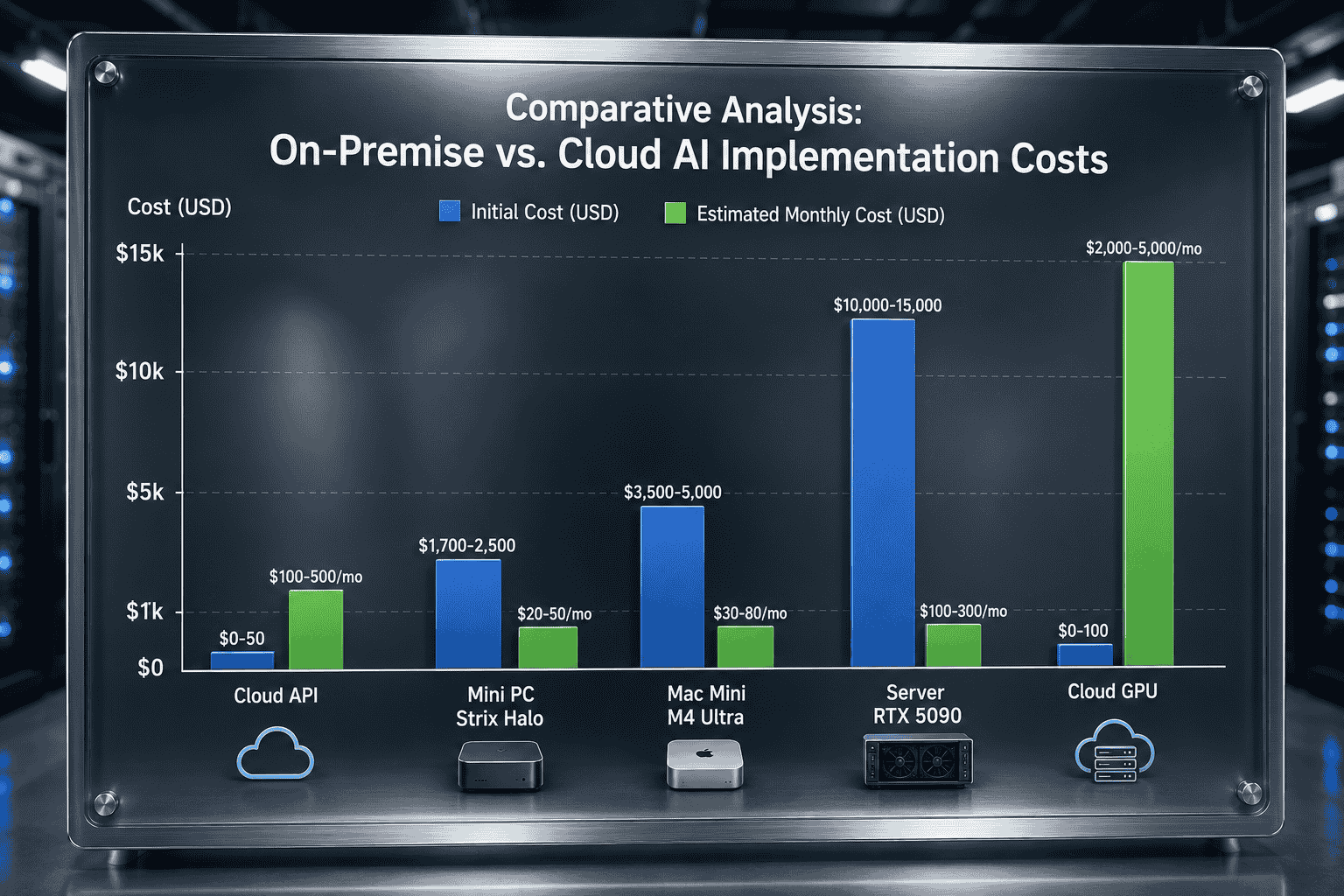
Cost reference across different approaches, from cloud API to various hardware options
Cost matters. But without powerful enough hardware, all calculations are meaningless. And this is what has changed in the last 18 months.
1.3 Hardware breakthrough - the game changer
Strix Halo (Ryzen AI Max+ 395, 128GB unified memory) is the most discussed topic in the on-prem LLM community these months. Not by accident.
A laptop-socket chip can run a 70-billion-parameter model at usable speed. No server rack needed. No $30,000 enterprise GPU. A mini PC on a desk.
Real-world build guides on SitePoint and Medium already show the way: Ubuntu, Ollama, ROCm. Copy, paste, run.
Quick comparison with other options:
- Mac Mini M4 Ultra: runs smoothly, but max memory is lower and price is higher
- RTX 5090: CUDA (NVIDIA’s compute platform) is powerful, but VRAM is limited, needs multiple cards
- Cloud GPU: powerful but costs monthly, data goes outside
Strix Halo isn’t the best choice for everything. But it’s the sweet spot for SMBs: powerful enough, affordable enough, data stays put.
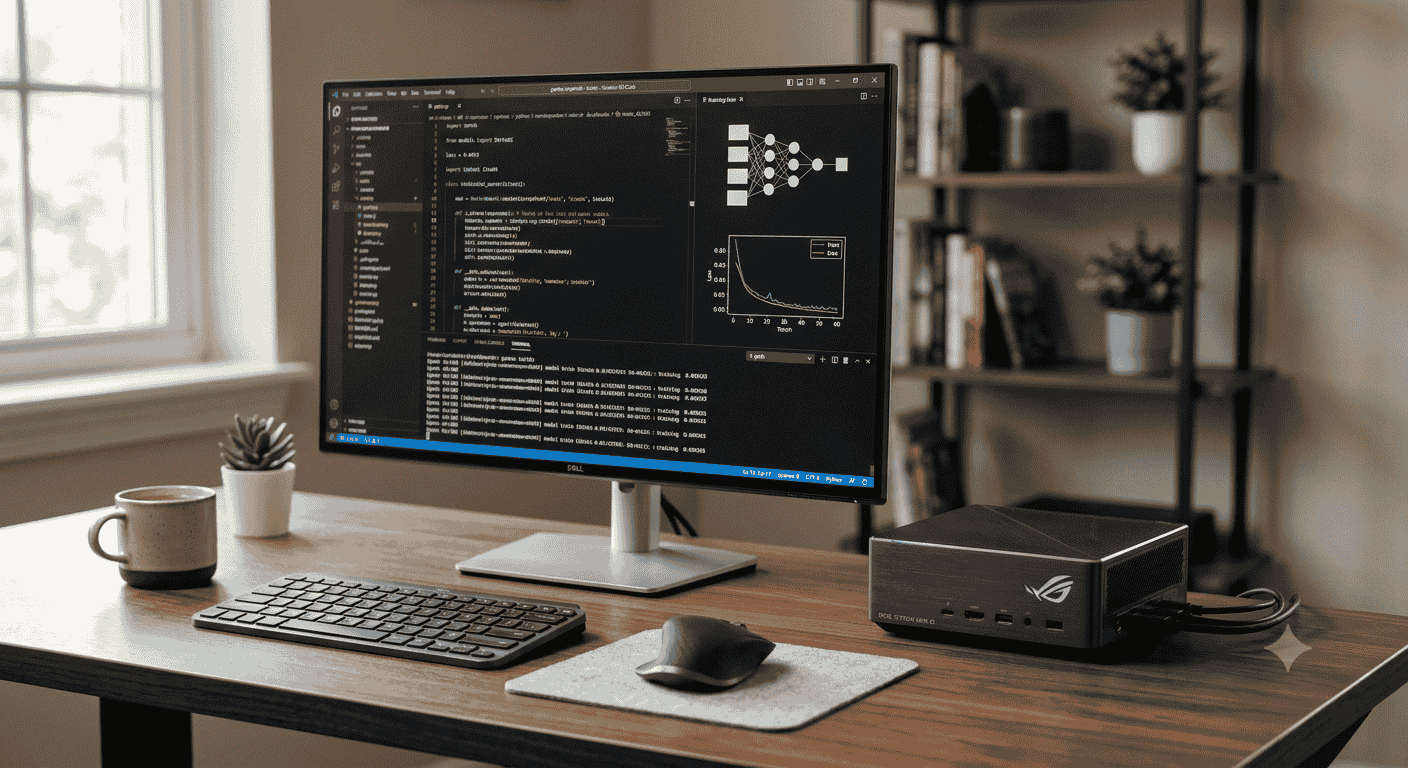
A typical on-prem LLM setup with a Strix Halo mini PC - small enough to sit on a desk
Hardware in place, but you also need software. This part has changed significantly too.
1.4 Open-source stack has matured
Three years ago, running a local LLM was a chore. Installing drivers, compiling from source, manually configuring everything.
In 2026, one ollama pull command plus Open WebUI gives you a chat interface. LlamaIndex and LangChain handle RAG. ROCm and Vulkan accelerate GPU.
No enterprise license needed. No vendor lock-in. The community has solved most of the headaches by now.
These four factors are converging at the same time, creating a rare window. The next question: what does this look like in practice?
Part 2: What the market is showing across industries
From what I’ve gathered from public threads on X and Reddit, a picture is emerging.
2.1 Legal
Threads by @hooeem and Jacob Klug on X describe building knowledge bases for legal professionals using local LLMs. The idea is simple: law firms have case law collections, contract templates, legal documents. Instead of sending them to the cloud for summarization, they run RAG (retrieving information from their own data store and using an LLM to generate answers) locally.
Results from the threads: contract review dropped from hours to 20-30 minutes. Data never leaves the office server.
(Some firms also use local LLMs to automate privilege logs - lists of documents protected by attorney-client privilege. They would never dare put this on the cloud, because one mistake means losing privilege protection permanently.)
Typical setup from the threads: Strix Halo Mini PC, Ubuntu, Ollama, RAG on internal documents. A 7-13 billion parameter model is sufficient for specific legal tasks, no need for larger models.
2.2 Healthcare
Threads on r/healthIT and r/medicine discuss clinical decision support and discharge note summarization using local models. Requirement number one: air-gapped (network isolated, no internet connection). No path out.
Some hospital systems have published case studies on HIPAA-compliant local deployment. Smaller models (7-13 billion parameters), focused on specific tasks rather than general-purpose AI.
Main use cases: summarizing discharge notes between shifts, symptom-based diagnosis support, and internal medical literature lookup.
2.3 Finance
Compliance monitoring and audit trail review are the primary use cases. Some small fintech companies run local LLMs to review transaction logs and detect anomalies. Data never leaves their systems.
2.4 A business model is forming
From threads on X, a pattern is emerging: technical builders put together a “local box” + RAG for clients. One-time setup fee. Recurring support contract. Several people share that they’re serving 5-10 SMB clients this way.
The sales approach is also interesting: bring the box to the meeting, let the client touch it, see it running on the table. Close rate is higher than explaining on slides. (This is an observation from multiple threads, not hard data.)
At this point, a critical question arises: if on-prem is so good, why isn’t everyone abandoning the cloud entirely? The answer is in the next section.
Part 3: The other side of the coin
I’m not pitching on-prem as a magic solution. It has problems. There are things the cloud does better, and I’ll say it plainly.
Pros
- Absolute privacy: Data never leaves where you put the machine. Ready for regulations like HIPAA, GDPR.
- Predictable cost: Know the number upfront, no surprise bills.
- Deep customization: Fine-tune models on your own data, build domain-specific RAG. Things the cloud can’t do because data isn’t allowed to leave.
- Low latency: Near zero. Suitable for document processing.
Cons
- Performance: With a 70-billion-parameter model, speed is a few tokens (units of text processing) per second. Good enough for document analysis and batch processing. Not enough for real-time chat with multiple users.
- Maintenance: Hardware fails, you fix it. Model updates are slower than the cloud. ROCm (AMD’s GPU compute platform) still has bugs on Linux with new hardware. (Trust me, you’ll spend at least an afternoon fixing a driver.)
- Scale: Suitable for SMBs. Dozens of users. If you need hundreds, you need a cluster.
- Physical security: Someone walks into the office and walks out with the mini PC. The cloud has better physical security.
When the cloud is still better
- Non-sensitive tasks: general chat, coding assistant.
- Burst workloads: don’t want to buy hardware for rare peak usage.
- Need immediate access to the latest models: cloud releases before quantized (compressed to reduce size) versions are available.
- Multiple users needing real-time responses.
There’s no absolute “cloud bad.” There are use cases suited to each approach.
Part 4: Opportunities and predictions
For technical practitioners
The SMB market in regulated industries represents hundreds of thousands of potential clients globally. Small law firms, private clinics, financial advisors. They have sensitive data. They need AI. They can’t trust the cloud 100%.
The opportunity is within reach. No enterprise team needed. No data center required. One person, one mini PC, and knowledge of RAG.
On the hardware side
Strix Halo is the beginning, not the end. Next-generation chips will be more powerful and cheaper. The unified memory trend (CPU + GPU sharing the same memory pool) is expanding across more chip families.
Personal predictions
From what I follow on X, Reddit, and public reports:
2026-2027 is the golden window for independent players. Big enterprise tools haven’t optimized for on-prem SMBs yet. Hardware is powerful enough. The stack is stable. Early movers have the advantage.
After 2027, big tech will ship standardized hybrid solutions with more competitive pressure. But by then, those who already have clients and reputation won’t be worried.
Community Q&A
While researching this piece, I noticed several questions that kept recurring. Below are answers based on public threads and discussions.
Q: What model size is enough for a small office?
A: From threads on r/LocalLLaMA, 7-13 billion parameter models (7B-13B) are sufficient for most document tasks (summarization, review, lookup). A 70B model is only needed if you require deep reasoning or complex contract analysis. Strix Halo 128GB can run 70B, but at slower speeds.
Q: Do I need a discrete GPU?
A: Strix Halo has an integrated GPU with 128GB unified memory, no discrete GPU needed. If you’re using a desktop and need higher performance, an RTX 5090 with CUDA offers better speed but VRAM is limited to 32GB - not enough for a 70B model on a single card.
Q: What do I lose by going local instead of cloud?
A: Quite a bit. Local models are usually older versions, unquantized ones can lag, and you handle maintenance yourself. The cloud always has the latest models immediately. This is the trade-off between privacy and convenience.
Q: What’s the real cost of a one-time setup?
A: From public guides on SitePoint and Medium: mini PC $1,700-2,500 + setup time (a few hours to a day). If you know Linux, you can do it yourself. If hiring someone, add $200-500. Budget around $2,000-3,000 for the first time.
Q: How do I convince management to invest in on-prem instead of the cloud?
A: A tip from threads on X: compare projected 12-month costs. Cloud fluctuates. On-prem is a fixed number. For sensitive data, the compliance argument is even stronger than the cost argument. Bring both to the table.
This article is based on public data and discussions from X, Reddit (r/LocalLLaMA, r/healthIT), SitePoint, Medium, AMD/Apple/NVIDIA official channels, and industry reports. This is not investment advice or legal counsel.