Will the Battle Between Cursor, Copilot, and Claude Code Truly Reshape the Software Industry’s Productivity Platform by FY2026?

Contrarian View: The ‘Battle’ Framework Was Flawed From the Start
Framing the discussion as “Cursor vs. Copilot vs. Claude Code” is inherently a product of tech media. These three tools rarely compete head-on for the same use case or user base. Cursor is optimized for developers who prefer an AI-first IDE experience. GitHub Copilot is optimized for organizations already embedded in the Microsoft/GitHub ecosystem. Claude Code is optimized for engineers needing agents capable of multi-file, multi-terminal, and multi-step operations directly from the command line.
Lumping these three tools into a single “battle” is like claiming Tesla, John Deere, and Caterpillar are competing for the same car market. Technically, they’re in the same broad industry, but their target customers and value propositions are entirely different.
The real question isn’t “who wins,” but rather: which layers of the software productivity platform are these tools restructuring? And which layer—if any—will permanently change how engineering teams of 50 to 500 operate on a daily basis?
Deconstructing the Four Core Layers of the 2026 Productivity Platform
A 2026 software productivity platform, at its most basic, consists of four stacked layers. Understanding these layers makes the debate “Cursor vs. Copilot vs. Claude Code” significantly clearer.
Layer 1: Editor Surface — Where Engineers Place Their Cursor
This is the layer engineers see and interact with daily: the editor, sidebar, chat panel, autocompletion, inline diffs. Cursor dominates here by forking VSCode directly and embedding AI natively into the interface—no extensions needed. Copilot is present, but mostly as a plugin layered onto existing IDEs. Claude Code, by design, doesn’t compete at the editor layer—it operates outside the editor, in the terminal.
Layer 2: Agent Layer — The Engine of Autonomous Execution
This layer holds the greatest potential for transformation. The Agent Layer refers to a system’s ability not just to suggest code, but to execute commands, read files, modify multiple files in sequence, create pull requests, run tests, parse error logs, and iterate until the task is complete. Claude Code stands out here, built from the ground up as agent-first. Copilot is rapidly adding agent capabilities via Copilot Coding Agent and Copilot Workspace. Cursor has an Agent mode, but its focus remains on interactive editing rather than long-running autonomous execution.
Layer 3: Context and Memory — The Long-Term Knowledge Base
A great agent depends not just on the model, but on the context window and how it’s populated. The Context Layer includes: full codebase indexing, semantic search, retrieval from internal documentation, PR history, ticket comments, and memory of past architectural decisions. No vendor holds a clear lead here. Cursor uses proprietary codebase indexing. Copilot leverages GitHub’s ecosystem (issues, PRs, code search). Claude Code relies on on-demand file loading combined with third-party tools.
Layer 4: Governance — Control, Permissions, and Compliance
This is the layer large enterprises truly care about: which tools are allowed to push code to the cloud, what data can be used for training, who can view logs, and whether standards like SOC2, ISO 27001, or HIPAA are maintained. Here, Copilot has historical advantage due to Microsoft’s deep enterprise relationships. Cursor and Claude Code are building their enterprise tiers, but lack the same level of customizable policy enforcement.
Core Insight: The three tools occupy different layers of the same stack—they’re not fighting on the same battlefield. Organizations that recognize this early will gain structural advantages.
From “Tool Battle” to “Productivity Stack Architecture”
Once separated into four layers, an obvious truth emerges: no single tool dominates all layers. A serious software company in 2026 won’t pick just one tool. They’ll assemble a stack, with each layer potentially provided by a different vendor.
The most common emerging model:
- Editor: Cursor (for individual developers and prototyping) or VSCode + Copilot extension (for organizations needing governance).
- Agent: Claude Code or Copilot Coding Agent (for multi-step execution tasks).
- Context: Cursor’s codebase indexing, GitHub Code Search, or custom retrieval solutions.
- Governance: SSO, audit logs, data residency—provided by Copilot Enterprise or standalone AI gateways.
In other words, the so-called “battle” is actually a process of fragmenting the productivity stack, not replacing one tool with another.
Execution Strategy for Engineering Teams
Principle 1: Choose by Workflow, Not Hype
Don’t start by asking, “which tool is best?” Start by asking, “which workflow consumes the most time?” If the bottleneck is inline autocompletion and refactoring, Cursor wins. If it’s PR review and ticket handling, Copilot wins. If it’s architectural refactoring or production log debugging, Claude Code wins.
Principle 2: Separate Dev Environment from Production Agent
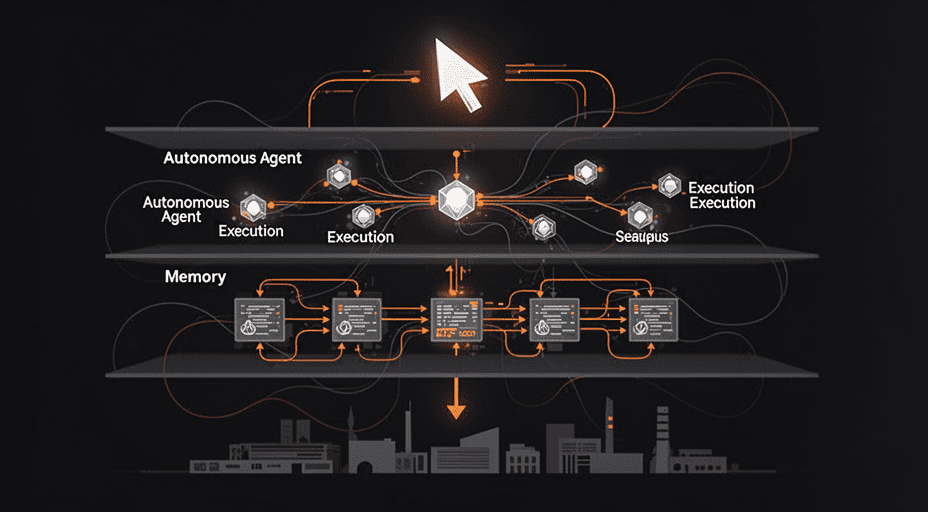
A common mistake is allowing a single agent to operate both in low-risk code suggestion layers and high-risk infrastructure manipulation layers. Clearly separate: which agents can write files, which can call external APIs, and which can run database migrations. This is a governance issue, not a tool issue.
Principle 3: Measure by Cycle Time, Not Lines of Code
The only meaningful AI productivity metric is cycle time—from ticket creation to production deployment. Metrics like “number of accepted code suggestions” have high marketing value but low managerial value, as they don’t reflect overall quality.
Simulated Case Study: FinCore and the Productivity Stack Restructure
FinCore is a fictional fintech company with 220 engineers working on a payment platform. In early FY2026, the engineering leadership noticed fragmented developer experience: some teams used Cursor, others used VSCode + Copilot, and senior engineers ran their own Claude Code setups. This created three concrete issues.
First, knowledge sharing declined because each team built different AI habits. Effective prompt patterns existed only in the minds of a few individuals.
Second, audit trails were inconsistent—the compliance team couldn’t track which AI-generated code came from where, by which tool. A serious regulatory risk in finance.
Third, onboarding new engineers slowed down due to a lack of standardized workflows. Every new hire had to discover tools and habits from scratch.
Rather than choosing a single tool, FinCore’s leadership designed a productivity stack with four clear decisions. Cursor became the default editor for individual developers due to its superior inline experience. Copilot Enterprise became the core governance layer thanks to Microsoft’s SSO, audit logging, and data commitments. Claude Code was granted a dedicated agent role for large-scale refactoring and production incident response. An internal AI gateway sat in the middle of all requests, logging, rate-limiting, and filtering traffic.
These four layers did not replace each other—they stacked on top of one another, each with its own vendor but unified under a shared governance framework.
Key takeaway from this simulation: The “tool battle,” when viewed organizationally, is not the real issue. The real issue is whether your stack architecture is intentional. Before asking “which tool should the team use,” ask: “which layer of the productivity stack is missing, and which vendor best fills it?”
Comparison Table of Three Solutions
| Criterion | Cursor | GitHub Copilot | Claude Code |
|---|---|---|---|
| Editor experience (Layer 1) | Deep integration, VSCode fork, AI-native UI | Extension on VSCode and JetBrains, stable | No standalone UI, runs in terminal |
| Agent capability (Layer 2) | Has Agent mode, focused on inline editing | Has Copilot Coding Agent, works well with PRs | Strongest in multi-step, multi-file execution |
| Context and Memory (Layer 3) | Proprietary codebase indexing, strong semantic search | Leverages GitHub issues, PRs, code search | File-based loading, requires external tools for large codebases |
| Governance (Layer 4) | New enterprise tier, still developing | Strong historical advantage with Microsoft enterprise | Anthropic Enterprise tier, limited policy customization |
| Platform model | Multi-model (Claude, GPT, Gemini, user-selectable) | Primarily GPT, gradually expanding | Claude only |
| Learning curve | Low for existing VSCode users | Lowest, already integrated | Medium to high, requires CLI fluency |
| Best suited for | Startups, product teams, rapid prototyping | Large organizations, teams needing strict governance | Senior engineers, platform teams, SREs |
Layer-Based Scorecard
| Criterion | Cursor | Copilot | Claude Code |
|---|---|---|---|
| Editor Surface (Layer 1) | 9 | 7 | 4 |
| Agent Layer (Layer 2) | 7 | 6 | 9 |
| Context and Memory (Layer 3) | 8 | 7 | 6 |
| Governance (Layer 4) | 5 | 9 | 6 |
| Model Flexibility | 9 | 6 | 4 |
| Learning Curve | 8 | 9 | 6 |
| Suitability for Large Enterprises | 6 | 9 | 7 |
| Average Score | 7.4 | 7.6 | 6.0 |
On a conventional 10-point scale: 1–4 = Low, 5–8 = Fair, 9–10 = Excellent.
All three tools score in the Fair range overall. Cursor scores 7.4, led by strength in Editor Surface (9) and Model Flexibility (9), but held back by Governance (5). Copilot scores 7.6, pulling ahead due to its excellence in Governance (9)—the only vendor among the three to achieve an “Excellent” score. Claude Code scores 6.0 overall—the lowest of the three—but earns an Excellent score in Agent Layer (9), reflecting its true strength as an agent-first tool, not an editor replacement.
Important Note: This scorecard reflects a mid-2026 snapshot. All three vendors are actively strengthening their weaker layers—Cursor improving governance, Copilot expanding agent capabilities, and Claude Code enhancing editor integration through partnerships—so gaps will narrow significantly in the next 12–18 months.
Forecast for 2026–2027 and Conclusion
Three high-certainty trends for the remainder of FY2026 and early 2027.
First, AI gateways dedicated to software development will emerge—a middleware layer sitting between all agents and internal APIs. Solutions like Portkey, Cloudflare AI Gateway, or custom-built platforms will become standard in every organization with over 100 engineers. Reason: no AI vendor alone can meet enterprise policy requirements, so an intermediary layer becomes essential.
Second, the concept of an “AI productivity platform” will separate from “AI coding tool.” Code generation is a feature, not a platform. A true platform will integrate the editor, agent, context, governance, and possibly even CI/CD systems with telemetry.
Third, organizations will embrace multi-tool environments instead of enforcing a single standardized tool. Over the past 12 months, the trend of “choose one and ban others” has clearly diminished. Instead, teams are now intentionally designing productivity stacks, with each layer served by the vendor best suited to that layer’s workload.
Expert Insight: The real battle isn’t between the three tools. The real battle is between the “one tool wins all” mindset and the “intentional stack architecture” mindset. It’s the latter that will redefine how the software industry operates in FY2026 and beyond.
If you’re a CTO or engineering lead reading this, here’s a tactical recommendation: don’t ask your team which tool to use. Ask which layer of your productivity stack is missing—and then pick the tool that fills exactly that gap. That’s the only way to avoid falling into the “tool battle” trap that the media continues to amplify. The final answer to this article’s title is: yes—but not in the way most people think.
Related Posts

Why the Business Models of AI Apps Like OpenClaw, Hermes, and MCP Platforms Are Driving a Shift from the App Economy to the Agent Economy?

Three Latest Data Attack Vectors on AI Systems That Every Business Owner Must Know Before Delegating Control to Open-Source Models

Can AI Self-Evaluation Radically Transform the Way We Monitor Systems?

What Are the Boundaries in Modern Production Processes When AI Agents Like Cline Can Read Codebases, Fix Bugs, and Automatically Deploy to Cloud Platforms?
Cost Revolution: Why New Generation AI Chips Make On-Premise the 'Gold Standard' in 2026?